By late afternoon, a lot of people reach the same point. Your neck feels tight. Your low back starts to ache. You lean closer to the screen without realizing it, round your shoulders, and keep working because the day isn’t done yet.
That pattern feels normal, but it shouldn’t feel inevitable. If you’re searching for how to improve posture while sitting at desk work, the answer isn’t “just sit up straight.” Good posture at a desk is a system. It includes how your chair fits your body, how often you move, which muscles support your spine, and when standard ergonomic rules need to be adjusted because pain is already part of the picture.
Why Your Desk Job Is Causing More Than Just an Ache
A desk job rarely hurts all at once. It builds gradually. First it’s stiffness after a long meeting. Then it’s the heavy feeling between your shoulder blades. Then it’s the low back soreness you notice every time you stand up.
That’s one reason posture problems get dismissed. People assume discomfort is just part of computer work, when in reality poor sitting mechanics can affect pain, concentration, and how much energy you have left by the end of the day.
Why the problem gets so common
In the United States, 60% of adults sit for over six hours a day, and poor desk posture contributes to $190 billion in related healthcare costs annually. The same source notes that up to 70% of workstation-related musculoskeletal disorders are preventable with proper ergonomic interventions and habits according to OSHA data, as summarized in this posture and productivity review.
When people hear “posture,” they often think appearance. In clinic, posture is really about load. Where is your head positioned? Which tissues are being compressed? Which muscles are overworking just to keep you upright?
Practical rule: If your posture only feels “good” when you’re forcing yourself to stay rigid, it probably won’t last through a workday.
Pain doesn’t stay isolated
A slumped sitting position can show up as neck pain, shoulder tension, headaches, mid-back fatigue, hip tightness, or low back soreness. It can also feed into other issues that seem separate from posture at first. If sitting leaves you sore through the front or side of the hip, this guide on painful hips after sitting can help you connect the dots.
There’s also a visual strain piece that many people miss. If you use bifocals or tilt your chin up to see part of the screen, your neck may be working around your eyewear, not just your desk setup. In those cases, task-specific lenses like Style Site Optical's workplace vision solutions can reduce the need to crane your neck toward the monitor.
What actually helps
The people who improve most usually don’t rely on one fix. They combine three things:
- A better setup so the desk stops pulling them into bad positions
- Frequent resets so they’re not static for hours
- Targeted exercise so their body can support a neutral posture without constant effort
That’s the difference between temporary “sit straighter” reminders and lasting change.
Your Ergonomic Blueprint A 5-Minute Workstation Audit
A good workstation should make neutral posture easier, not harder. You shouldn’t have to hold yourself in place by sheer willpower all day.
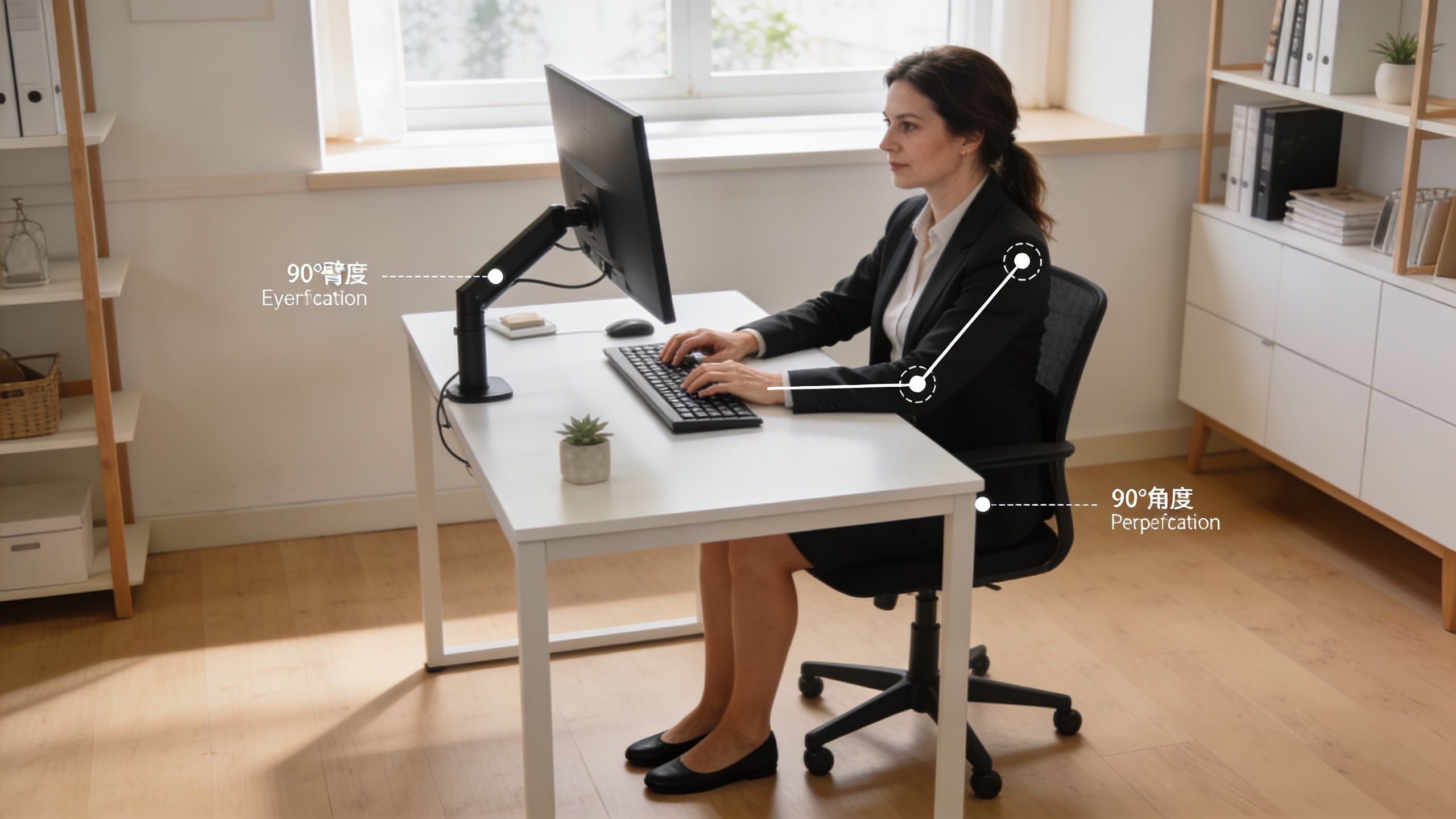
Physical therapy sources indicate that adjusting your chair so your feet are flat with knees at 90 degrees, and setting your monitor so the top is at eye level and arm’s length away, can reduce musculoskeletal disorder risk by up to 50% in office workers, with 70-85% pain reduction in low back and neck symptoms after 4 weeks when combined with hourly checks, as outlined in this guide to correct sitting posture at a desk.
Start with the chair
Your chair is the foundation. If it’s too high, your feet dangle and your pelvis loses support. If it’s too low, your hips tuck under and your low back rounds.
Use this quick checklist:
- Set chair height first. Your feet should rest flat on the floor or on a footrest. Your knees should be at about 90 degrees.
- Check hip position. Your hips should be level with or slightly higher than your knees.
- Sit all the way back. Your back should contact the backrest so the chair can support you.
- Support the low back curve. If the chair lacks lumbar support, add a lumbar roll or small cushion.
A lot of people shop for comfort but ignore adjustability. If your current seat is fighting you, this roundup of best chairs for back relief is a practical place to compare features like lumbar support, seat depth, and armrest adjustment.
Fix your arm and shoulder position
Shoulders usually get tense when the desk or armrests are wrong. If your elbows drift too far away from your body, your upper traps and neck muscles start doing work they shouldn’t.
Aim for:
- Elbows bent around 90 to 120 degrees
- Upper arms close to your sides
- Shoulders relaxed, not shrugged
- Wrists neutral, not cocked upward to reach the keyboard
If armrests push your shoulders up or block you from getting close to the desk, lower them or move them out of the way. Armrests should support your arms, not dictate a strained position.
Good posture doesn’t mean pinning your shoulder blades back all day. It means letting your ribcage, pelvis, and shoulders stack in a way your muscles can sustain.
Get the monitor right
Monitor setup matters because your neck follows your eyes. If the screen is too low, you flex your neck forward. If it’s too high, you tip your chin up and compress the back of the neck.
Use these targets:
| Workstation element | What to aim for | Why it matters |
|---|---|---|
| Monitor height | Top of screen at eye level | Reduces neck flexion or chin lift |
| Monitor distance | About arm’s length away | Limits leaning forward |
| Screen angle | Slight tilt for easy viewing | Helps reduce head jutting |
| Keyboard placement | Close enough to keep elbows near sides | Reduces shoulder strain |
If you use a laptop, don’t accept the built-in compromise. Raise the screen and use an external keyboard and mouse when possible. Otherwise you’re choosing between poor neck posture and poor arm posture.
Finish with one fast self-test
Once everything is set, do a simple body scan:
- Feet grounded
- Knees at 90 degrees
- Back supported
- Breastbone gently lifted
- Head stacked over shoulders
- Eyes level with the top of the screen
If one area feels forced, don’t ignore it. Posture that only works in theory usually fails by noon.
Building Active Posture Habits Throughout Your Day
Even a well-set desk won’t save you from being motionless. The body tolerates variety much better than stillness.
That’s why posture has to become active. Not stiff, not military, and not overcorrected. Active posture means you notice drift early and make small corrections before your neck, back, or hips start complaining.
Use repeatable cues instead of willpower
It’s often not a lack of motivation. It’s a lack of effective triggers.
Tie posture resets to things you already do:
- After every email batch, uncurl from the screen and reset your head position
- At the start of each meeting, plant your feet and check whether you’re sitting on your tailbone or on your sit bones
- Whenever the phone rings, relax your jaw and drop your shoulders
- Each time you refill water, stand tall for a few breaths before walking away
These tiny moments matter because slouching often starts gradually. The earlier you catch it, the less the muscles have to fight to bring you back.
Learn two low-effort resets
The best posture drills are the ones you’ll perform during a workday.
Chin tuck
Sit tall and keep your eyes level. Gently draw your head straight back, as if making a double chin. Don’t tip your head up or down. You should feel the back of the neck lengthen.
This helps when your head starts drifting forward toward the screen.
Scapular retraction
Without arching your low back, gently draw your shoulder blades back and slightly down. Hold briefly, then relax. The movement should come from the shoulder blades, not from flaring the ribs.
This helps reopen the chest after prolonged keyboard and mouse use.
The goal isn’t to hold these corrections forever. The goal is to teach your body what centered feels like, then return to it often.
Think stacked, not straight
“Sit up straight” usually makes people do one of two unhelpful things. They either stiffen every muscle they have, or they overextend their low back and pin their shoulders back.
A better cue is to stack your body:
- Head over shoulders
- Ribs over pelvis
- Feet supported underneath you
That position gives your postural muscles a fair workload. It also reduces the need for your neck and low back to compensate.
What doesn’t work well
A few habits look helpful but usually backfire:
- Holding your abs tight all day causes fatigue
- Squeezing shoulder blades together constantly creates upper back tension
- Forcing perfect posture for hours usually ends with a bigger collapse later
- Ignoring discomfort because your setup “looks ergonomic” delays useful changes
The people who do best are flexible with the method and consistent with the habit. They reset often, move often, and don’t expect one position to feel ideal for an entire day.
The Desk Worker's Corrective Exercise Routine
By the time many desk workers notice posture breaking down, the pattern is already familiar. The head has crept forward, the chest feels stiff, the upper traps are doing too much work, and the mid-back is no longer sharing the load well. A corrective routine helps because it gives those overloaded areas a break while rebuilding strength in the muscles that should be carrying more of the job.
That said, exercise is not a punishment for sitting. It is a way to change tissue tolerance, joint position awareness, and muscular endurance so your setup works better for you. In clinic, I often see the same problem: people are told to sit perfectly, but they do not have enough mobility in the front of the body or enough endurance in the back of the body to make that position comfortable for long.

Open the areas that tighten first
Start with mobility if you feel stiff, compressed, or pulled forward by the end of the workday. These drills usually work best after a few hours of sitting, not as aggressive stretches first thing in the morning.
1. Chin tuck
Sit with your eyes level and jaw relaxed. Glide the head straight back, as if you are making a small double chin, then return to neutral. Keep the motion gentle and avoid tipping the chin up or down.
This can reduce strain on the irritated tissues at the base of the neck when forward head posture has become your default.
2. Upper trapezius stretch
Sit on one hand or hold the edge of the chair to keep that shoulder from hiking up. Tilt your head away until you feel a light stretch along the side of the neck. Breathe normally and keep the stretch mild.
Use this for tension. Skip it if it causes tingling, arm symptoms, or a headache that spreads upward.
3. Doorway pec stretch
Place your forearm on the doorframe with the elbow slightly below shoulder height, then step through until you feel a stretch across the front of the chest. Keep the ribs down so the motion comes from the chest and shoulder, not from arching the low back. For a visual setup, this pec stretch in doorway guide shows the position clearly.
This stretch is especially useful for people who spend hours with the arms in front of the body on a keyboard or mouse.
4. Hip flexor stretch variation
If space allows, stand beside your desk and take a short split stance. Gently tuck the pelvis and shift your weight forward until you feel the stretch in the front of the hip of the back leg. If standing is not practical, move to the front edge of the chair and use a smaller version of the same pelvic tuck.
This matters more than many people expect. Tight hip flexors can tip the pelvis forward and make it harder to find a comfortable trunk position while seated.
Build strength where posture usually collapses
Mobility creates room. Strength lets you keep using that room once work gets busy.
For desk workers, the weak link is often endurance rather than raw strength. The shoulder blade muscles fatigue, the trunk stops giving steady support, and the neck takes over. That is why lighter resistance with good control usually works better than heavy loads and rushed reps.
- Rows: Use a band, cable, or machine. Pull the elbows back without shrugging. Let the shoulder blades move, then finish with a gentle squeeze between them.
- Reverse flies: Start light. Lift the arms out and back in a wide arc while keeping the ribs quiet and the neck relaxed.
- Core bracing: Exhale first, then tighten the abdominal wall just enough to create support while you continue to breathe. The goal is steadiness, not a hard brace.
A practical starting dose for rows and reverse flies is 2 to 3 sets of 8 to 15 controlled reps. Use a resistance level that feels challenging by the last few reps but does not force you to shrug, arch, or rush.
Clinic insight: If an exercise leaves your neck tighter than when you started, the target muscles probably are not doing enough of the work yet.
A simple sequence you can repeat
Use this sequence once or twice a day, or break it into smaller pieces if pain or fatigue builds as the day goes on. People with a history of neck pain, shoulder impingement, or low back pain often do better with shorter, more frequent sets than with one longer routine.
| Body region | Exercise | Focus |
|---|---|---|
| Neck | Chin tucks | Re-center the head |
| Neck and shoulders | Upper trap stretch | Reduce muscle guarding |
| Chest | Doorway pec stretch | Improve chest mobility |
| Upper back | Rows or reverse flies | Build shoulder blade endurance |
| Hips | Hip flexor stretch | Reduce front-of-hip stiffness |
| Trunk | Core bracing | Improve seated support |
Keep the movements controlled and symptom-guided. Mild muscular effort is fine. Sharp pain, numbness, tingling, or symptoms that linger after the routine are signs to reduce the range, lower the load, or get the exercise checked by a clinician.
Implementing Microbreaks and Sit-Stand Strategies
By 10:30, the pattern is usually clear. Your neck starts to feel heavy, your low back gets stiff, and you catch yourself shifting around in the chair trying to find a position that still feels tolerable.
That usually is not a sign that you failed to “sit correctly.” It is a sign that your body has been in one position too long.
Tissues handle load better when the load changes. Muscles need small chances to relax and contract again. Joints do better with regular motion. Blood flow improves when you interrupt stillness. That is why a good posture plan includes more than chair setup and corrective exercise. It also needs planned position changes during the workday.
Use movement on a schedule
The best microbreak is the one you will repeat.
For many desk workers, a simple starting point works well:
- Every 20 to 30 minutes: change position for 20 to 60 seconds
- Every 60 minutes: stand up and walk briefly, even if it is just to the printer, water bottle, or another room
- Two to four times per day: add 1 to 2 minutes of reset work such as shoulder rolls, a few chin tucks, or a short chest-opening stretch
That dose is enough to reduce the strain of static loading without breaking your concentration every few minutes.
If timers make you feel interrupted, attach breaks to tasks instead. Stand after each meeting. Walk while reading a document. Reset your position after sending a batch of emails. In clinic, I find habit-based triggers work better than rigid rules for people with busy schedules or pain that flares unpredictably.
How to use a sit-stand desk without trading one problem for another
A sit-stand desk gives you options. It does not fix posture by itself.
Many people start too aggressively. They stand for long blocks, lock their knees, shift their hips forward, and by lunch their feet hurt and their low back feels tighter than it did in the chair. The better approach is to build tolerance in small intervals.
A practical starting plan looks like this:
- Start with 15 to 30 minutes of standing at a time
- Return to sitting before you feel fatigued
- Alternate across the day instead of trying to stand for half the morning
- Keep a small bend in the knees and distribute weight through both feet
- Use a footrest or alternate one foot onto a small box if your back gets tight
- Continue taking short walking breaks, because standing still is still static load
If standing increases symptoms, do not force it. Some people with hip irritation, foot pain, nerve sensitivity, or low back pain tolerate supported sitting better than prolonged standing. Those cases need a more individualized plan, sometimes paired with hands-on care such as manual therapy in physical therapy to improve tolerance to movement and position changes.
A weekly plan that is realistic
Here is a sample schedule that combines work blocks, position changes, and brief resets without turning your day into a second job.
| Day | Morning (5 min) | Mid-Day (10 min) | End of Day (15 min) |
|---|---|---|---|
| Monday | First sit-stand interval, posture reset | Short walk, desk standing block | Rows, reverse flies, hip flexor stretch |
| Tuesday | Seated work block with 2 microbreaks | Standing block, brief walk | Upper back strength and trunk control work |
| Wednesday | Sit, stand, then walk rotation | Chest opener and movement break | Hip mobility and rowing pattern |
| Thursday | Supported sitting block, then stand | Walking break, shoulder reset | Reverse flies, core bracing, gentle mobility |
| Friday | Alternate positions through morning tasks | Short walk and neck reset | Full desk-worker routine |
| Saturday | Light activity, less total sitting | General movement session | Stretch tight areas only |
| Sunday | Easy walk or mobility | Optional brief standing practice | Prep desk for the week |
What good sit-stand use looks like in real life
Good use is not about hitting a perfect number of standing minutes. It is about keeping symptoms from building momentum.
The people who do best with this usually do four things consistently:
- They change position before pain spikes
- They adjust the screen and keyboard for both sitting and standing
- They include walking, not just standing in place
- They scale the plan up or down based on symptoms that day
That last point matters. Standard rules fail when they ignore your body’s response. If your pain history is more complicated, the right strategy is often shorter, more frequent position changes, with more support and less strain.
When to See a Physical Therapist for Your Posture
If your symptoms improve when you change your setup, move more often, and do a few corrective exercises, that’s a good sign. It means your body is responding to load management.
If pain keeps showing up anyway, posture advice from the internet may not be specific enough for you.
A 2023 study in Physical Therapy found that 68% of desk workers with low back pain had worse symptoms from rigid ergonomic rules. The same source notes that a physical therapist can provide individualized cues such as a 110-135 degree recline, which can reduce disc pressure by 40-60%, as discussed in this video summary on why rigid posture rules can worsen symptoms.

Signs you shouldn’t keep guessing
Consider professional help if you have any of the following:
- Pain that persists despite changing your workstation and activity habits
- Radiating symptoms into the arm or leg
- Numbness or tingling
- Frequent headaches tied to desk work
- Pain after surgery or an old injury that returns when you sit
- Positions that are supposed to help, but clearly make you worse
Those patterns suggest that the issue may involve more than basic desk ergonomics. You may need a movement exam to identify whether the problem is coming from the neck, shoulder, low back, hip, thoracic spine, nerve irritation, or a combination.
Why personalized posture advice matters
Generic advice assumes everyone can tolerate the same “ideal” sitting posture. That isn’t true for people with disc-related pain, scoliosis, hypermobility, hip stiffness, post-surgical changes, or significant muscle imbalance.
A physical therapist looks at how you move, where you compensate, and which cues your body responds to. Sometimes the right answer is more upright sitting. Sometimes it’s a slight recline. Sometimes it’s changing the angle of your hips, adding lumbar support, or reducing the amount of time spent in any single position.
If a posture cue works for your coworker but increases your symptoms, the cue isn’t automatically correct. It may just be wrong for your body right now.
Hands-on care can also help if stiffness and pain are limiting your ability to tolerate exercise or desk changes. If you’re not sure what that includes, this explanation of what manual therapy is in physical therapy gives a clear overview.
For people who need more specific guidance, Highbar Physical Therapy offers movement assessments and treatment plans that can be delivered in clinic or through telehealth, depending on the situation. That’s useful when you need your desk setup and exercise plan matched to your symptoms rather than to a generic checklist.
Your Action Plan for Lasting Postural Change
Lasting posture change usually comes from three things working together.
First, build a static foundation. Set up the chair, screen, keyboard, and arm position so your body isn’t fighting the desk all day. Second, create dynamic habits. Reset your position often, use movement breaks, and stop treating one “perfect” posture as something you should hold for hours. Third, use active recovery. Stretch what gets tight, strengthen what gets tired, and give your body the capacity to maintain better alignment.
Consistency matters more than perfection. A few smart changes repeated every workday will do more than one intense ergonomic overhaul that you abandon by next week.
If you’ve been wondering how to improve posture while sitting at desk work, start small. Fix one workstation problem today. Add one movement break tomorrow. Layer in one exercise routine this week. That’s how people get lasting relief.
If your neck, back, shoulders, or hips still hurt after trying these changes, a physical therapist can help you figure out why and build a plan that fits your body. You can learn more or connect with a provider at Highbar Physical Therapy.